










Know Where Every Dollar Goes
You can’t manage what you can’t see. For many business owners, the financial picture lives in scattered places: a payroll report here, a bank statement there, a stack of receipts somewhere in between. When someone asks “are we profitable this quarter?” the honest answer is often a guess.
A profit and loss statement template fixes that problem. One worksheet pulls your revenue and expenses into a single view, so you always know whether your business made money, lost money, and exactly why.
What Is a Profit and Loss Statement Template?
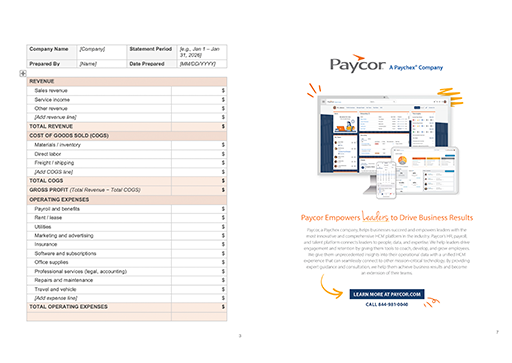
A profit and loss statement template (also called a P&L template or income statement template) is a pre-built worksheet that organizes your revenue, cost of goods sold, and operating expenses into a standard financial format. The result is your bottom line: net income for the period.
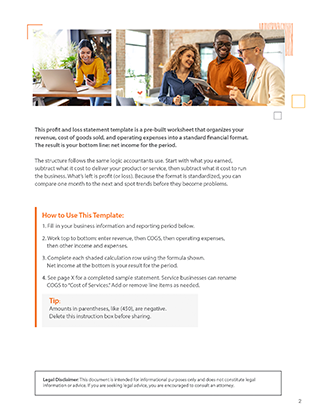
The structure follows the same logic accountants use. Start with what you earned, subtract what it cost to deliver your product or service, then subtract what it cost to run the business. What’s left is profit (or loss). Because the format is standardized, you can compare one month to the next and spot trends before they become problems.
Why Do I Need a Profit and Loss Statement Template?
A P&L statement is one of the three core financial statements every business needs, alongside the balance sheet and cash flow statement. Here’s what a template version does for you:
- Shows profitability at a glance. Net income sits at the bottom of the page. No spreadsheet formulas to build, no accounting degree required.
- Supports loan and credit applications. Lenders almost always request a P&L statement. Having a current one ready speeds up approval.
- Simplifies tax preparation. Your accountant needs the same revenue and expense categories the template already organizes.
- Reveals cost creep early. When expenses are tracked by category each month, a rising line item stands out immediately.
- Keeps stakeholders informed. Partners, investors, and boards expect standardized financials, not a homemade summary.
What Is Included in the Sample P&L Template?
The template follows the standard income statement structure, with every section pre-built and ready to fill in:
- Business information header (company name, statement period, date prepared)
- Revenue section for sales income, service income, and other revenue streams
- Cost of goods sold (COGS) section covering materials, direct labor, and production costs
- Gross profit calculation (revenue minus COGS)
- Operating expenses section with common categories: payroll, rent, utilities, marketing, insurance, software, and more
- Operating income calculation (gross profit minus operating expenses)
- Other income and expenses section for interest, taxes, and one-time items
- Net income line, your bottom line for the period
A sample completed statement is included as a reference, so you can see exactly how a finished P&L should look.
How to Make a Profit and Loss Statement (With This Template)
Follow these steps to complete your first statement:
- Choose your reporting period. Monthly is the most useful cadence for spotting trends. Quarterly and annual statements work well for lenders and tax prep.
- Enter your revenue. Record all income earned during the period, broken out by source. Use your sales records, invoices, or point-of-sale reports.
- Record cost of goods sold. Include only the direct costs of producing what you sold: materials, direct labor, freight. Service businesses can rename this section “cost of services.”
- Calculate gross profit. Subtract COGS from total revenue. This tells you how much you earn before overhead.
- List operating expenses. Work through each category: payroll, rent, utilities, marketing, insurance. Pull numbers from your payroll reports and bank statements.
- Add other income and expenses. Capture interest earned, interest paid, taxes, and any one-time gains or losses.
- Calculate net income. Subtract total expenses from total revenue. A positive number means profit. A negative number means loss, and the line items above tell you why.
How a Sample Profit and Loss Statement Template Helps
Building a P&L from a blank page means deciding what categories to track, how to structure the math, and whether your format will satisfy a lender or accountant. A template removes all three questions. The structure is standard, the categories cover what most businesses need, and the layout is one finance professionals recognize on sight.
The included sample statement matters just as much. Seeing realistic numbers in a completed example makes it much easier to map your own records into the right lines, especially if this is the first financial statement you’ve prepared yourself.
Most importantly, a template makes the habit repeatable. The businesses that catch financial problems early are the ones that produce a P&L every month, not just at tax time. When the worksheet is ready and familiar, monthly reporting takes minutes instead of an afternoon.
Download Your Free Profit and Loss Statement Template
Stop guessing about your bottom line. Download the free P&L statement template, fill in your numbers, and get a clear read on your business performance this month.
CTA: Download Free Template
Profit and Loss Template FAQs
Is the profit and loss statement template free?
Yes, it’s completely free. Download it once and reuse it every month, quarter, and year. No expiration dates, no usage limits.
Who should use the free P&L statement template?
This template was built for business owners, office managers, and finance leads who need clear financials without building a spreadsheet from scratch. It’s especially useful for small business owners preparing for tax season or a loan application, new businesses creating their first financial statements, and growing companies that want a consistent monthly reporting habit before investing in accounting software.
Is the profit and loss statement template suitable for small business?
Yes. The template was designed with small businesses in mind. The expense categories reflect the costs most small businesses carry (payroll, rent, utilities, marketing, insurance), and the format is simple enough to complete without an accountant. As your business grows, you can add line items or hand the same structure to a bookkeeper.
Can I customize the profit and loss statement template for my industry?
Absolutely. Every section is editable. A restaurant might break COGS into food and beverage costs. A consulting firm might rename it “cost of services” and emphasize contractor fees. Add, remove, or rename any line item so the statement reflects how your business actually operates.
What format does the simple profit and loss statement come in?
The template comes as a fillable PDF. Once completed, you can share with lenders, accountants, or partners.
Can I use the profit loss statement template to prepare for taxes?
Yes. A completed P&L is one of the most useful documents you can hand your tax preparer because it organizes income and deductible expenses into the categories they need. Keep in mind the template is a reporting tool, not tax advice. Your accountant will confirm which expenses qualify as deductions for your situation.
How can I use the profit and loss statement template?
Pick a reporting period, then work top to bottom: enter revenue, subtract cost of goods sold to get gross profit, subtract operating expenses to get operating income, then account for other income, expenses, and taxes to reach net income. The template includes a completed sample statement, plus step-by-step instructions, so you can see how each section should look before you start. Repeat monthly and you’ll build a running record of business performance.