











Every Dollar Deserves a Paper Trail
Whether your team travels for business, entertains clients, or regularly incurs job-related costs, keeping expenses organized isn’t just good practice, it’s important for compliance, reimbursement, and financial visibility.
Without a consistent system, expense tracking quickly becomes a mess of forgotten receipts and unreconciled charges.
Our free expense report template gives your team a ready-made, customizable framework to document, submit, and approve expenses with clarity and consistency.
Download it once. Use it as many times as you need.
What Is an Expense Report Template?
An expense report template is a pre-formatted document that employees and managers use to record and submit business expenses for reimbursement or accounting purposes.
Instead of building a system from scratch, an expense template provides a standardized structure that covers everything from employee information and expense categories to totals and approval signatures so the process is repeatable and audit ready.
A good template saves time on both sides of the transaction:
Employees submit complete, accurate records, and managers or finance teams can review and approve them faster.
Why Is It Important to Use a Template for Expenses?
Inconsistent expense reporting creates real problems for businesses — missed reimbursements, inaccurate cost tracking, compliance gaps, and disputes over what was or wasn’t approved. A template brings discipline to the process.
With a standardized format, your organization can:
- Ensure every expense is captured
- Speed up reimbursement cycles
- Maintain a clean audit trail
- Reduce expense fraud
- Track spend by project, department, or employee
For small businesses especially, where resources are lean and every dollar counts, a structured expense report template is one of the simplest tools you can put in place.
What Is Included in the Paycor Expense Report Template?
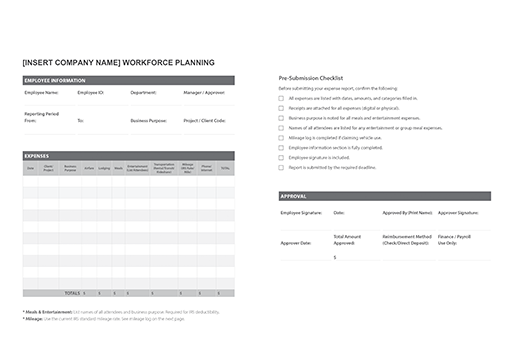
The Paycor expense report template is designed to capture all the information your team needs to submit and process business expenses accurately. Here’s what’s inside:
- Employee Information: Name, Employee ID, manager, and department so every submission is tied to the right person and team.
- Reporting Period: Date range covered by the report, keeping submissions organized chronologically.
- Expense Categories: Pre-defined columns for airfare, lodging, meals, entertainment (with space to list attendee names), transportation (rental car, public transit, rideshare), mileage at the current IRS rate, and phone/internet costs.
- Client or Project Field: Allows employees to attribute expenses to specific clients or projects for accurate billing and budget tracking.
- Totals Row: Auto-summing fields (when used in an editable format) that calculate the total amount owed for reimbursement.
- Approval Signature Block: A designated section for manager sign-off, including printed name, signature, and date.
The template is clean, straightforward, and easy to customize for your organization’s specific categories or policies.
Benefits of Using a Free Expense Report Template
Using an expense report template rather than figuring everything out from scratch every time makes things easier on everyone from employees to payroll.
It Saves Time for Everyone Involved
Building an expense report from a blank document wastes time. A ready-made template means employees spend less time figuring out what to include and managers spend less time asking for missing information.
It Standardizes Your Expense Process
When every employee uses the same format, your finance team can process submissions faster and with fewer errors. Consistency eliminates confusion about what information is required, how expenses should be categorized, and what the approval workflow looks like.
It Reduces the Risk of Expense Fraud
Structured templates with required fields, approval signatures, and defined categories make it much harder for inaccurate or unauthorized expenses to slip through. A clear paper trail protects your business.
It Supports Tax and Compliance Readiness
Expense reports are key source documents for tax deductions, contractor payments, and financial audits. A consistently filled-out template means your records are organized and defensible, whether you’re filing taxes or responding to an audit.
It Scales with Your Business
Whether you have five employees or five hundred, the same template works. As your business grows, a standardized process means you won’t need to overhaul your system, just expand it. When you’re ready to graduate from manual tracking to automated expense reporting, your historical records are already clean and structured.
It’s Free and Customizable
There’s no cost to download and no licensing required. The template is designed to be modified. Add your company logo, adjust expense categories, or tailor the approval workflow to match your internal policies.
What Can You Use This Company Expense Report Template For?
While the template is built around common business expense scenarios, it’s versatile enough to support a wide range of use cases:
Business Travel: Capture flights, hotel stays, ground transportation, and meal costs for employees traveling for work.
Client Entertainment: Track meals, events, or other costs incurred while entertaining clients or prospects, with a field to document attendee names as required for IRS purposes.
Remote Work Expenses: Document phone, internet, or equipment costs incurred by remote employees.
Project-Based Spending: Attribute expenses to specific client accounts or internal projects for accurate billing and budget reporting.
Mileage Reimbursement: Record miles driven for business purposes at the current IRS standard mileage rate, making reimbursement straightforward for both employees and payroll.
Recurring Monthly Reporting: Use as a monthly expense report template to give employees and finance teams a predictable, consistent submission and review cycle.
Understanding the difference between reimbursable expenses and taxable compensation — like certain stipends — is important context for how you categorize and process submissions.
What You’ll Need to Fill in the Template for Expenses
Before sitting down to complete an expense report, employees should have the following on hand:
- Receipts for each expense being submitted, digital or physical
- Dates of each expense
- Client or project name if expenses are billable or project-attributed
- Business purpose for any meals or entertainment expenses (required for IRS deductibility)
- Names of attendees for any entertainment or group meal expenses
- Mileage logs if claiming vehicle use, including start and end locations
- Manager or approver information so the completed report goes to the right person
How to Use the Expense Report Template
Using the expense report template couldn’t be easier. Just follow these steps and you’re good to go!
Step 1: Download the Template
Click the download button on this page to get your free copy of the expense report template.
Step 2: Add Your Company Information
Customize the header with your company name and logo. Adjust any expense categories to reflect the types of costs your organization typically incurs.
Step 3: Distribute to Your Team
Share the template with employees and communicate your expense reporting policy, including submission deadlines, reimbursement timelines, and which expenses are eligible.
Step 4: Employees Complete and Submit
Each employee fills in their personal information, the reporting period, and each line-item expense. They should attach receipts and provide a brief business purpose for any meals or entertainment.
Step 5: Manager Reviews and Approves
The designated approver reviews the submission for accuracy and policy compliance, then signs the approval block and forwards to finance or payroll for reimbursement.
Step 6: File for Your Records
Keep a copy of each approved expense report — digital or physical — for your accounting records and tax documentation.
When your team is consistently managing expenses, you’ll get much cleaner data on your overall labor costs and business spend. For organizations ready to automate this process entirely, Paycor’s expense management software can streamline submission, approval, and reimbursement in one platform.
Download Your Free Expense Report Template
Ready to bring consistency and clarity to your expense reporting process? Download your free expense report template. Customize it for your business, share it with your team, and start tracking every dollar the right way.
Business Expense Report Template FAQs
Want to know more about using a business expense report template? Keep reading!
Who should use this expense report template?
This template is designed for anyone who needs to track and submit business expenses from individual employees seeking reimbursement to HR managers, operations leaders, and small business owners building out their expense management process for the first time.
It’s particularly useful for small and mid-sized businesses that want a professional, consistent system without investing in dedicated software right away.
What industries can this expense report template be used in?
The template works across virtually any industry where employees incur business-related expenses. It’s well-suited for professional services, healthcare, construction, retail, manufacturing, technology, nonprofits, and more.
In what format does the expense report template come?
The expense report template is available as a downloadable PDF. It can be opened, edited, and saved on most devices and operating systems. The PDF format helps ensure the template retains its professional formatting no matter where it’s accessed or printed.
Is it possible to customize the expense report template to fit my business?
Yes. The template is designed to be fully customizable. You can add your company logo and name, adjust expense categories, modify the approval workflow, and tailor any section to match your internal policies. Whether you need to add a project code field, adjust the mileage rate, or remove categories that don’t apply to your business, the template gives you a solid foundation to build on.
Legal Disclaimer: Paycor is not a legal, tax, benefit, accounting, or investment advisor. This document is intended for informational purposes only and does not constitute legal information or advice. All communication from Paycor should be confirmed by your company’s legal, tax, benefit, accounting, or investment advisor before making any decisions.