










Restaurant Scheduling Made Simple
When you run a restaurant, you’re always managing constant last-minute changes. Servers call out sick. A bartender requests Friday off. Your new host needs a mentor to handle their first brunch shift. Without a consistent system, scheduling can quickly get out of hand.
A restaurant schedule template gives you a simple, repeatable starting point. Download it once, reuse it every week, and you’ve got a system your whole team understands.
What Is a Restaurant Schedule Template?
A restaurant schedule template is a pre-formatted document that lets you assign shifts, track hours, and communicate coverage to your entire staff. Instead of building a new schedule from scratch each week, you start with a ready-made structure and fill in the details.
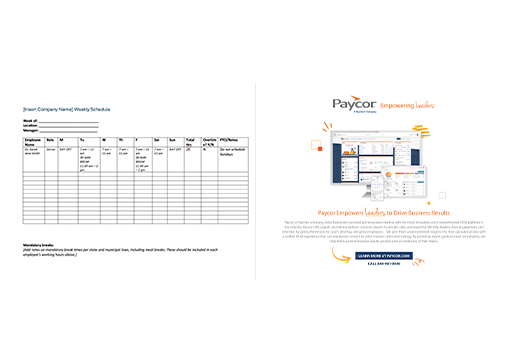
Most templates are set up as weekly grids, organized by day and shift, with space for each employee’s name, role, and scheduled hours.
Why You Should Use a Restaurant Scheduling Template
A schedule template streamlines workforce management and improves communications. When employees know what to expect, they show up ready to work – not confused about your expectations.
A structured employee schedule sends a message to your team: you take their time seriously. Employees who receive clear schedules in advance are more likely to plan around their shifts and flag conflicts before they become problems. A template also leaves a paper trail, so if there’s ever a question about hours worked or shift assignments, you can reference the original document.
Benefits of Using a Template for Restaurant Scheduling
A template helps you build trust and drive long-term retention. The following advantages compound over time.
Faster Schedule Creation
A blank template reduces the time it takes to build a schedule. You already have the structure. Fill in names, shift times, and notes, and you’re done.
Fewer Scheduling Conflicts
When you have every shift laid out in one place, you can spot gaps and overlaps more easily. Managers can see at a glance if they’re short on line cooks Saturday night or overstaffed at the host stand on Tuesday morning.
Improved Employee Satisfaction
Consistent, predictable scheduling matters to your staff. Advance notice makes it possible for employees to plan their personal lives. This practice can also help you stay compliant with predictive scheduling laws.
Increased Scheduling Compliance
Weekly hour totals are visible at a glance, which makes it easier to adjust before employees start accruing overtime. This is especially helpful for teams subject to minor labor laws or local fair workweek ordinances.
What’s Included in the Restaurant Schedule Template
The template includes everything you need to design a restaurant shift schedule:
- Staff names and roles
- Shift times and coverage blocks for each day of the week
- Breaks and rest periods to support labor law compliance
- Daily and weekly hour totals per employee
- Notes for availability, PTO requests, and shift swaps
The layout is intentionally flexible. Whether you run a full-service restaurant, a café, or a bar, you can easily adapt it to fit your staffing structure.
How to Use the Restaurant Employee Scheduling Template
Our user-friendly restaurant scheduling template saves time for managers and sets employees up for success. Here’s how to use it:
- Download the template. Click the link below to get your free copy.
- Add your staff. Fill in employee names and their primary roles in the designated columns.
- Enter shift times. Assign start and end times for each team member across each day of the week.
- Note break periods. Mark required rest breaks to stay compliant with local labor laws.
- Check your hour totals. Review daily and weekly totals to see if any employees are earning overtime pay.
- Add availability notes. Use the notes column to flag PTO, availability restrictions, or approved shift swaps.
- Share with your team. Send the completed schedule at least a week in advance, so staff members can plan accordingly.
Download Your Free Restaurant Schedule Template
A well-built schedule is one of the simplest ways to support your team and run a smoother operation. Download our free restaurant schedule template and put it to use this week.
Restaurant Schedule Template FAQs
Get the answers to HR’s top questions about using a restaurant scheduling template.
Can I customize the scheduling template for my restaurant?
Yes, the template is designed to be customizable. You can edit names, roles, shift times, and notes directly in the template.
What format does the restaurant schedule template come in?
The template is downloadable as a free PDF.
Who should use this template for restaurant employee scheduling?
Any food service operation can use this template, from small cafés to full-service restaurants, bars, and multi-location chains. If you manage shift workers, this template gives you a clean, shareable format.
Can a restaurant scheduling template help reduce labor costs?
Yes. Visible weekly hour totals make it easier to catch overtime risks early and balance coverage against anticipated traffic. Consistent scheduling also drives retention, which reduces recruiting costs over time.
How often should I update the restaurant schedule template?
Most restaurants publish a new schedule every week. Distribute yours at least seven days in advance, so team members have adequate notice. This is especially important in jurisdictions with predictive scheduling requirements.
Is a restaurant scheduling template better than scheduling software?
A template is a strong starting point for smaller operations or teams with straightforward schedules. As your headcount grows, scheduling software can automate the process, flag conflicts in real time, and connect directly to payroll and time and attendance data.