









Build an AI Policy That Drives Results
Your employees want to use AI at work. That’s a good thing. AI tools speed up the busywork, empowering workers at every level to think more strategically.
But as of now, few companies have given employees clear rules for safe AI usage. An AI Acceptable Use Policy closes that gap, spelling out which tools are approved and who’s accountable when something goes wrong.
Pair the guidance below with our free template to build a policy that meets your company’s needs and leaves room to grow.
What Is an AI Acceptable Use Policy?
An AI Acceptable Use Policy tells employees exactly which AI tools they can use at work, and how. General IT or data security policies cover devices, networks, and software – but in this era, you need more than that. Your new AI policy should zero in on a narrower, faster-moving problem: how people use large language models like ChatGPT, Copilot, and Gemini to do their jobs.
If you don’t have a formal policy, your company is already at risk of falling behind. Employees adopt AI tools on their own, often called shadow AI, and paste sensitive information into platforms nobody on your team has vetted. HR and legal teams then have to spend time chasing down compliance issues instead of designing a strategy.
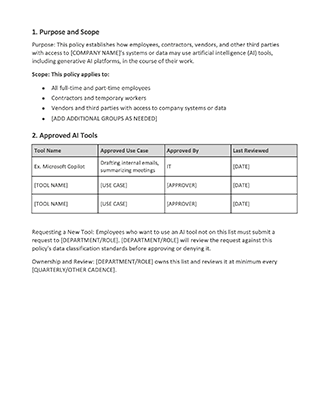
The scope of your AI usage policy matters as much as content. A framework that only covers full-time employees misses the contractors, vendors, and third parties who use company systems and data every day. Define who your policy applies to before you write a single rule, so nobody falls through the cracks.
Why Your Company Needs One Now
AI policies used to be a luxury. Not anymore. Employees adopt new AI tools faster than most companies can evaluate them, and waiting for a perfect policy means they’re operating off the map.
If that’s your current state, you’re at risk of data leaks and regulatory exposure. Employees may produce inconsistent deliverables, and unedited AI-generated work can damage your company’s reputation. Best practices regarding AI use are changing fast, and consumer expectations are high.
If you’re still building your core HR policies from the ground up, a broader HR checklist for startups can help you get started.
Core Components Every AI Acceptable Use Policy Should Include
The strongest AI policies cover the following topics, at minimum. Every company is unique, so make sure your version is tailored to meet your team’s needs.
Approved AI Tools and Governance
Start with a living list of the AI tools your company allows, and name which tasks each one is approved for. For example, a standalone AI tool, an AI feature built into existing software like Copilot, and an industry-specific AI application each carry different risk profiles; treat the list as a working document instead of a one-time decision.
Data Classification for AI Use
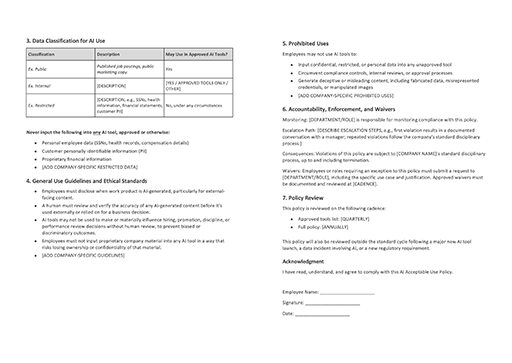
Not all company data belongs in an AI tool, even an approved one. Classify data by sensitivity level, then spell out which types of data employees may never input into any AI system: personal employee data, personal customer information, and financial details top the list for most companies.
General Use Guidelines and Ethical Standards
Set clear behavioral guardrails that apply no matter which tool someone uses. For example, you could require employees to disclose when work is AI-generated, especially for external-facing content. Build in a human review step before anyone publishes or acts on AI output and require fact-checking before AI-generated content goes live.
Ethical standards deserve their own section. Address bias prevention directly, especially for AI-assisted decisions in hiring or performance reviews, where a flawed input can produce a discriminatory outcome at scale. Cover intellectual property too. Employees need to know whether AI-generated work belongs to the company, and whether inputting proprietary material into a tool creates any ownership risk. Your compliance team should review this section before you finalize the policy.
Prohibited Uses
List prohibited activities in plain language, not legalese. Employees should be able to read this section once and know exactly where the line is. At minimum, you should prohibit inputting confidential data into any unapproved tool, using AI to get around compliance controls or internal reviews, and generating deceptive or misleading content. Name real scenarios your employees are likely to encounter, since specific examples land better than abstract rules.
Accountability, Enforcement, and Waivers
Every policy needs clear consequences. Note who monitors compliance, whether that’s IT, HR, a dedicated AI governance committee, or some combination of all three. Map out an escalation path; a first-time mistake and a repeated violation should trigger different responses. Connect consequences to your existing disciplinary framework. Consistent, documented enforcement is one of the most important HR best practices for any workplace policy.
How to Use Our AI Acceptable Use Policy Template
Treat the template as a starting point, not a finished document. It gives you the structure. Your company’s tools, data, and risk tolerance will help you fill in the rest.
Step 1: Audit Before You Customize
Before you fill in a single placeholder field, find out which AI tools your employees are already using. Talk to a few teams directly, check expense reports for AI subscriptions, pull data from IT, and survey the entire organization. The approved tools list only works if it reflects real behavior, not what IT wishes people did instead. Be prepared for this process to reveal that some employees are already using unsafe tools.
Step 2: Customize Each Section to Your Context
Work through the template section by section. Replace every placeholder field, adjust the data classification tiers to match language you use internally, and tailor the prohibited uses list to match your industry’s specific compliance requirements. A healthcare company and a manufacturing company will fill in very different examples under the same headers.
Step 3: Get Cross-Functional Sign-Off Before Publishing
Route the completed draft to HR, Legal, IT, and any relevant compliance stakeholders before you distribute it to the entire company. The template gives you a strong starting draft, but it doesn’t constitute legal advice. Have an expert review the final version before it becomes a binding company policy.
How HR Teams Roll Out and Enforce the Policy
A finished policy only works if your employees can access and understand it. Once you finalize the document with your legal team, HR should own the rollout. That means you’ll need to:
- Communicate the policy directly to every employee.
- Require workers to confirm receipt of the document.
- Add a step to your onboarding process for employees to review and sign.
- Update your employee handbook to link to the complete policy for reference.
- Schedule annual acknowledgments of the current policy. Since it’s a living document, it will change over time.
Make sure to explain how you’ll hold team members accountable to established guidelines. For example, will you respond to AI policy violations through your existing performance and disciplinary processes, or will it be handled separately? How will violations be documented? How will HR and direct supervisors respond to first-time vs. repeated infractions?
Keep the Policy Current as AI Tools Evolve
A static AI policy can quickly become a liability. These tools are changing so rapidly, last quarter’s prohibited uses list might not cover the most current risks. Set a formal review cadence and stick to it. Quarterly is best; annually is the bare minimum.
Some events call for an update outside the standard cycle. A major new AI tool launch, a data incident involving AI, or a new regulatory requirement should each trigger an immediate review rather than waiting for the next scheduled cycle.
How Paycor Helps You Manage AI in the Workplace
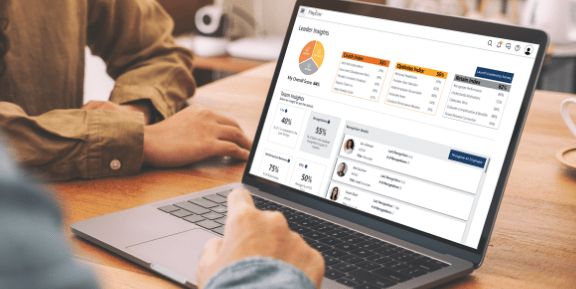
Once your AI Acceptable Use Policy is live, Paycor’s HCM platform gives you a single place to track policy acknowledgments alongside onboarding, performance records, and every other document tied to an employee’s file.
Want to see it in action? Schedule a guided tour to help your team navigate this new era of work.