











Change Management Timeline
Welcome to your Paycor Implementation Journey!
This timeline provides a high-level overview of the key milestones you’ll experience as you transition to Paycor. While specific dates and timeframes will vary based on your organization’s needs and the products you’ve selected, this roadmap will help you understand what to expect at each stage and prepare your team accordingly.

Project Kick-off & Data Discovery
Meet your implementation team and discuss what to expect from your Paycor Implementation.

Data Extraction Call
Gather current system data and build the reports that Paycor requires for configuration.

Discovery Review for Core Products
Gather the information needed to configure your Paycor database according to your organization’s specific needs.

Weekly Status Updates
Stay up to date every week on overall project status and health.

Second Full Data Extraction
Pull new data reports to ensure all employee-level changes since the first extraction are captured.

ACA Filing Tool Configuration
Meet IRS requirements accurately, on time, and with confidence.

Configuration Review for Core Products
Review your customized Paycor database, gain system access, and begin testing.

LMS Kickoff & Configuration
Ensure your organization is ready to access and utilize these learning solutions.

Check Review
Identify trends and discrepancies between your current provider and Paycor’s setup.

Paycor Access Granted & Dual Maintenance
Ensure all data in Paycor is up to date before first payroll processing.

Balance Entry (Current Year Payroll and Data Review)
Gather YTD Balance Entry files so Paycor can provide W2’s at the end of the year.

First Payroll Process/Live Time Punching/HR and Onboarding Live
All systems go!

General Ledger Configuration
This task marks a critical milestone in your payroll and accounting integration process.

Paycor Recruiting Configuration & Go-Live
Set up jobs, use Smart Sourcing, and manage candidates.

Everyday Support Begins
Access the customer hub where you can find the knowledge base and additional support.
Lorem ipsum dolor sit amet, consectetur adipiscing elit dolor sit amet

Project Kick-off & Data Discovery
Meet your implementation team and discuss what to expect from your Paycor Implementation.
Why this Matters: We’ll review the implementation process, your success criteria, project timeline tracker, and review data requirements to begin the project.
Goal: Ensure alignment on your product go-live dates, project timeline, key deliverables, training recommendations, review key goals and outcomes, and discuss scheduling your data extraction call.
What to Expect: During this 60–90-minute call, your implementation team will share their screen and the Kick-Off Presentation deck as well as set expectations for your implementation.
Stakeholders Involved: Payroll and HR Administrators who will be involved in the implementation process
Your Action Items:
Action Items:
- Register for Paycor.com once your implementation team sends you your registration link.
- In the Getting Started Portal, complete all sections within the Call Preparation menu, including stakeholders, work locations, department structure, other company info, and Document Checklist.
- Ready to elevate your recruitment process? Click here to explore our approved background partners and discover how they can help strengthen your hiring decisions.
Resources:

Using the Getting Started Portal
Follow these steps for data collection in the Getting Started Portal to begin implementation.

Preparing for Implementation
Steps to take before kicking off implementation and the data discovery call.

Data Extraction Call
Gather current system data and build the reports that Paycor requires for configuration.
Why this Matters: We will gather and build the reports in your current payroll system that Paycor requires for Standard Configuration.
Goal: Upload employee general static info, recuring earnings, scheduled deductions, federal/state/local tax info, current pay rates, and active direct deposits into the Getting Started Portal.
What to Expect: During this 60–90-minute call, your Paycor Data Specialist will use screen share to navigate your current provider’s system to gather required data elements. Reports/information gathered will be uploaded to the Gathering Files section of the Getting Started Portal. Note: We do not pull historical documents (incl. employee-level documents, tax forms, and I-9), time card data, schedules or company policies. Additionally, we only extract data from a single system. For example, when we are working on your payroll database, we will not access your HR database.
Stakeholders Involved: User should have full admin rights and knowledge of how to pull data reports in case data specialist has questions. User will not have access to their computer during the data pull.
Your Action Items:
Action Items:
- After the call, upload any PTO polices, GL specifications, COA, and child support/garnishment orders into the Getting Started Portal. Include data extraction & new hire onboarding documents.
Resources:

Document & Field Import Specifications
Follow these steps to help ensure you’re accessing and uploading the correct data elements for extraction.

Discovery Review for Core Products
Gather the information needed to configure your Paycor database according to your organization’s specific needs.
Why this Matters: We will gather and build the information in your current departmental, Payroll, HR, Time, and Benefits systems that Paycor requires for configuration.
Goal: Review all information that was uploaded during the Data Extraction call for accuracy.
See action items below for specific product callouts.
Your Action Items:
Why This Matters: This dictates how your payroll database will be configured. We’ll cover earning codes, deduction codes, taxes and time off policies.
Goal: Review department/org structure, work locations, payroll earnings/deductions/taxes, payroll/pay group configuration, payroll frequency, and contacts and delivery needs.
What to Expect: During this 60–90-minute call, your Payroll Implementation Consultant will review the information uploaded during Data Extraction. They will ask you questions about your current payroll system configuration including payroll earnings, deductions, taxes, paystub and W2 requirements, department structure, and a review of your contacts, delivery, processing dates, and bank account info.
Stakeholders Involved: Payroll decision maker, payroll manager, payroll admin.
Your Action Items:
- Register for Payroll Level 1 training in the Paycor Training Hub.
- After the call, complete the Client Setup Quality Assurance Acknowledgement.
Why This Matters: This step sets up the appropriate base department for each employee and drives many components of the implementation. It serves as the foundation that the database is built on. Departments assign work in tax as well as drive the general ledger report.
Goal: Review department/org structure, learn the importance of the Paycor structure.
What to Expect: This 30–60-minute call hosted by your Payroll Implementation Consultant will review your current department/org structure details.
Stakeholders Involved: Organization decision makers, users with knowledge of general ledger needs and payroll tax setup knowledge.
Your Action Items:
- Take Paycor Department Basics training.
- See Blank Org Template.
Why This Matters: This step is designed to focus on your HR and onboarding setup and outlines your organization’s HR needs.
Goal: Gather information to better understand your HR processes such as onboarding, custom fields, and more.
What to Expect: This 60–90-minute call hosted by your HR Implementation Consultant walks through the HR/Onboarding business requirement document. The information collected will be used to customize your Paycor database.
Stakeholders Involved: HR Manager, HR Administrator, HR Specialist, HR decision makers.
Your Action Items:
- Take Paycor HR Virtual Training.
- After the call, complete the required setup documentation provided by your HR Implementation Consultant. Upload all outstanding documentation (e.g., current onboarding PDFs, job titles with EEO, etc.)
Why This Matters: This step is designed to help you understand the rules surrounding how employees track their hours, including scheduling, overtime, rounding, pay policies, and more as applicable.
Goal: Gather information needed to configure time policies, meal breaks, labor codes, and scheduling, plus more as needed, in Paycor.
What to Expect: This 60–90-minute call hosted by your Time Implementation Consultant walks through the Time business requirements document. The information collected will be used to customize your Paycor database.
Stakeholders Involved: Time decision makers with knowledge of current time policies, and Payroll Manager or Admin.
Your Action Items:
- Take Paycor Time Policies & Policy Groups training.
- Take Paycor Time Punch Profiles training.

Weekly Status Updates
Stay up to date every week on overall project status and health.
Why this Matters: Stay abreast of your organization’s implementation project progress.
Goal: Paycor and your teams to have 30-60 minute touchpoints that occur the same day/time every week to share overall implementation project status, timeline, and outstanding items.
What to Expect: Your implementation team will provide an agenda prior to each status call and host the discussion to provide project status and timeline updates.
Stakeholders Involved: Decision maker and/or admin for each core product (i.e., payroll, HR, Time & Benefits) should attend.
Your Action Items:
Action Items:
- Review weekly status call agenda and come prepared with updates to share.

Second Full Data Extraction
Why this Matters: It has been several weeks since your first data extraction, so it’s important to get your Paycor database in sync with your current payroll database.
Goal: This call will focus on pulling all new data reports to ensure we capture all employee level changes (e.g., new hires, terminations, promotions, etc.) since the first extraction.
What to Expect: The call will mimic the first Data Extraction Call. A data analyst will send you a meeting link prior to the meeting and ask you to sign into your current payroll system and allow them access. They will pull the same reports with the current data span.
Stakeholders Involved: Stakeholders should have admin access to your current payroll system and know how to pull reports and where the data resides.
Your Action Items:
Action Items:
- Be prepared to sign into your current payroll system and be without access to your computer for the 2-hour timeframe.
Note: Your team must track all changes that occur from this date until you receive full access to the database. After that time, you will enter any changes in the Paycor system.

ACA Filing Tool Configuration
Meet IRS requirements accurately, on time, and with confidence.
Why this Matters: Working together to configure your ACA filing tool helps ensure your organization is prepared to meet IRS requirements.
Goal: This call helps ensure your ACA filing tool is fully set up and aligned with your data and processes so you’re ready to file accurately, on time, and with confidence.
What to Expect: You will be asked to provide key information such as 15 months of historical hours, benefit plan details, and complete a questionnaire covering your measurement periods and safe harbor method. Once your data is submitted and you have access to the system, we will walk through how the tool works and make any necessary adjustments.
Stakeholders Involved: Payroll and HR managers and admins. Feel free to invite your Broker if you believe they can help with this process.
Your Action Items:
Action Items:
- Gather 15 months of historical hours to help determine employee eligibility and set up your measurement periods.
- Complete the ACA Questionnaire with your measurement method, lookback period, and safe harbor strategy.
- Collect Benefit Plan information such as plan names, eligibility rules, and any waiting periods.
- Attend the ACA Tool walkthrough meeting.
- Your ACA Rep will guide you through how to use the tool and answer any questions.
- Make sure your HR team, benefits broker, and payroll contact are looped in and ready to support the process.
Resources:

ACA Learning
ACA Filing FAQs and Help
Use this guide to help ensure you understand the ACA filing process.
ACA Implementation Questionnaire
Fill out this form to prepare for your ACA implementation.
Import Hours Template
Fill out this form to prepare for your ACA implementation.

Configuration Review for Core Products
Review your customized Paycor database, gain system access, and begin testing.
Why this Matters: We’ll review the implementation process, your success criteria, project timeline tracker, and review data requirements to begin the project.
Goal: Ensure alignment on your product go-live dates, project timeline, key deliverables, training recommendations, review key goals and outcomes, and discuss scheduling your data extraction call.
What to Expect: During this 60–90-minute call, your implementation team will share their screen and the Kick-Off Presentation deck as well as set expectations for your implementation.
Stakeholders Involved: Payroll and HR Administrators who will be involved in the implementation process.
See action items below for specific product callouts.
Your Action Items:
- Payroll Software Handoff Call
- Time Configuration Review
- HR and Onboarding Configuration Review
- Benefit Advisor Kickoff & Configuration
Why This Matters: This walkthrough call of your customized Paycor Database includes a review of the complete department/org structure, earnings/deductions/taxes, work locations, employee profiles and payroll processing, granting employee access.
Goal: Your Payroll Implementation Consultant will grant access to your Paycor payroll system and we will conduct an overview to ensure you can navigate it with confidence. At the end of the call, you will be responsible for making future updates and maintaining your data in preparation for your first payroll processing.
What to Expect: This 90+-minute call is hosted by your Payroll Implementation Consultant who will share your screen and walk your team through a deep dive of your Paycor database.
Stakeholders Involved: Payroll Manager and/or Payroll Administrators, as well as team members involved with any items listed in the “Why This Matters” section.
Your Action Items:
- Begin Dual Maintenance.
- Complete the Trusted Administrator Certification in the Training Hub.
- Review how to send registration invites.
- Understand granting employee access for self-service tasks.
- Review how to process a payrun.
- Download Payroll Processing Guide for future reference.
Why This Matters: All training should be completed by this point. This call is to show you where your time policies are located and verify setup. Proper setup is crucial to testing and go live.
Goal: Review your company configuraitons for time policies including meal breaks and rounding. Learn how to navigate the time dashboard, timecards, and review time for payroll.
What to Expect: This 60-minute call hosted by your Time Implementation Consultant will walk you through the time portion of the system.
Stakeholders Involved: Any stakeholders who were on the initial discovery call. No department managers are required.
Your Action Items:
- Assign punch profile and policy groups – This is either done in the system or on a spreadsheet provided by your Implementation Consultant.
- Add employee Punch Profiles
- Add employee Policy Groups
If you are using Scheduling or Scheduling Pro, talk to your Time Implementation Consultant about next steps for configuration.
Why This Matters: This call is designed to review the information your HR/Onboarding Implementation Consultant configured, as well as walk through the different services in HR/Onboarding.
Goal: After this call you will begin using Paycor to hire and onboard employees, run workflows, etc.
What to Expect: This 60-90-minute call hosted by your HR Implementation Consultant will walk you through the system and outline what was configured. You will walk through workflows, reminders, custom fields, and more. You will launch a test onboarding, and review how to assign documents and tasks to employees. You will also walk through employee profiles and understand how to terminate, place on leave, update assignments, and more.
Stakeholders Involved: HR Manager and HR Administrator
Your Action Items:
- After the call we suggest launching a test onboarding to yourself to make sure the onboarding employees see what you expect them to.
- Familiarize yourself with workflows and set up additional workflows needed as well as familiarize yourself with employee profiles and how to make the changes needed.
- Reminder: After the configuration review call, it is important to begin maintaining your database (Dual Maintenance). Anything that is updated in your current database must also be updated in Paycor to ensure a successful first processing.
- Why Benefit Advisor Matters:
- Whether you’re new to benefits admin technology or looking for a solution that can grow with your business, we have you covered. Paycor’s Benefits Advisor automates workflows and simplifies business processes while reducing duplicate entry and benefits spend.
- Additional features – Ask Emma: Benefits Decision Support, Automated Workflows, Streamlined Open Enrollments, Actionable Insights through robust reports and interactive dashboards, and Optional EDI Connections
- Goal (of completing the configuration):
- The objective of the BA Kickoff is to officially initiate the project by reviewing the project scope, timeline, responsibilities, and the necessary documents and information. During the Kick Off call, we will thoroughly discuss the requirements and gather all the information needed to design and build your customized system.
- The Configuration phase involves Paycor building your system based on the information you provided. Following this, we conduct a site Review call to guide you through your system, verify its accuracy, and make any necessary adjustments. At this stage, you will have access to a sandbox environment for testing and can provide feedback to your Implementation Consultant.
- What to Expect:
- Calls – Kickoff, BCM Review Call, Review Call, Audit Review Call, Go Live Call
- Expectations – Provide your Implementation Consultant with accurate and comprehensive information. Actively participate in calls to ensure the system is configured correctly from the outset and complete the Business Analyst training as required.
- Stakeholders Involved:
- It is beneficial to include anyone at your organization that handles benefit decisions (HR, Benefit Admin, etc.) and your broker, if you have one.
- Your Action Items:
- It is essential to maintain active engagement with your Implementation Consultant by providing accurate information, attending all scheduled meetings, and thoroughly testing your Benefits system to ensure its accuracy.

LMS Kickoff & Configuration
Why LMS Matters: To ensure your organization is ready and able to access and utilize these learning solutions to help train, upskill, or remain compliant as you need them.
What to Expect: Shortly after clients gain access to Paycor, they will receive an email letting them know LMS is being setup, and will be ready to access after their First Payroll Processing. This email will provide a training link if they want to get a head start on learning the system. From there, they can expect an email shortly after processing payroll which will inform them their account is ready, and provide them instructions and self service training materials to get started.
Stakeholders Involved: The Primary Contact on their account will be notified, and its recommended they loop in anyone else who will need Admin access for LMS.
Your Action Items: It’s recommended clients utilize the self service training materials around the time of processing to prepare them for access to their new system, so they can further tweak and customize the LMS to their liking.
Resources:
LMS Training for Administrators

Check Review
This step is designed to help you identify trends and discrepancies between your current provider and Paycor’s setup.
Why this Matters: Helps you and your Payroll Implementation Consultant uncover inconsistencies and variations from your current provider to Paycor’s setup enabling corrections to be made before your first payroll processing.
Goal: To identify trends and discrepancies between the registers and resolve them before your first payroll processing.
What to Expect: The Paycor Data Team will complete a 25% parallel payroll.
Stakeholders Involved: Payroll Implementation Consultants, Project Managers.
Your Action Items:
Action Items:
- Provide the most recent payroll register for the Paycor team to use.
- Review all callouts and update the data accordingly.
- Best Practice Guides

Paycor Access Granted & Dual Maintenance
Ensure all data in Paycor is up to date before first payroll processing.
Why this Matters: This is the final review of data and all Paycor information before processing your first payroll.
Goal: To continuously update employee data to ensure it stays current and accurate in both systems, while gaining knowledge and experience with the system.
What to Expect: After the Payroll Software Handoff Call you will be granted database access and should begin maintaining changes in your database. Anything that you update in your current payroll system must also be updated in Paycor to maintain data integrity and ensure the accuracy of your first payroll processing. This includes: new hires, terminations, status changes, employee profile changes such as pay rates, deductions, taxes, etc.
Stakeholders Involved: Payroll Admin, HR Admins, etc.
Your Action Items:
Action Items:
- Continue to keep track of system changes and update data accordingly.
Resources:

Data Import Guide
Step-by-step instructions for importing employee and company data into Paycor.
Managing Direct Deposits FAQ
Answers to common questions about setting up and managing employee direct deposit accounts.

How Do I Add, Edit or Delete Pay Rates?
Instructions for creating, modifying, and removing employee pay rates in the system.

Balance Entry (Current Year Payroll and Data Review)
Gather year-to-date Balance Entry files so Paycor can provide W-2s at the end of the year.
Why this Matters: The Balance Entry process ensures your employees receive accurate W-2s at year-end by capturing year-to-date totals from your previous payroll provider.
If you are a new business or going live with your first payroll of January – Balance Entry does not apply.
Goal: Gather and import YTD balance entry files so Paycor can provide W-2s to your employees at the end of the year, capturing YTD totals for all employees.
What to Expect:
- Schedule this call the day after you process payroll for the last time with your current provider to ensure reports are up to date.
- Once the Balance Entry specialist has your data formatted and ready for import, you will be locked out of the database and placed in “view only” mode. During this time, continue tracking employee changes.
- A red banner will appear on your screen when the system is locked (typical lockout time is approximately 4–6 hours but can vary).
- HR functionality, such as updating job titles, will be affected by the lockout.
- This lockout will not prevent employees from punching in and out.
- Once the database is unlocked, update the system with any tracked changes.
- If your go-live date is considered a Mid-Quarter Start, you’ll receive a Tax Impound letter detailing taxes owed and outstanding taxes due. Review, sign, and return it as soon as possible to complete the Balance Entry process and unlock your database. Tax impound monies will be debited the day after we receive your signed letter.
- Each employee will have a check #1 on their compensation history screen representing YTD totals loaded—this is not an actual check being issued.
- You may receive a notification stating “Congratulations you have successfully processed payroll”—don’t be alarmed, this is just the Paycor team loading YTD totals.
Your Action Items:
Action Items:
- Continue tracking all employee changes since your last data extraction.
- Ensure all new hires are entered into the system prior to your Balance Entry extraction date. Failure to complete this step will lead to a longer lockout period and potentially negatively affect first processing timing.
- Once you receive full database access, update the Paycor system with all tracked changes to ensure it syncs with your current system.
- Prioritize tracked changes for new hires, as the balance entry team cannot import YTD totals without them in the system.

First Payroll Process/Live Time Punching/HR and Onboarding Live
All systems go!
HR & Onboarding Go Live
Begin sending new hire invites through Paycor, send employee documents, and update employee profiles in Paycor as changes occur.
Time Punching Go Live
Employees who track time begin punching in/out of Paycor system.
Payroll Go Live
Your first payroll processing. Payroll must be submitted two business days prior to first check date to ensure timely check delivery.

General Ledger Configuration
This task marks a critical milestone in your payroll and accounting integration process.
Why this Matters: Accurate general ledger configuration ensures that payroll expenses are correctly categorized and posted to the appropriate accounts.
Goal: To validate the initial general ledger report provided by Paycor after your first payroll run, ensuring it aligns with your organization’s accounting structure and reporting requirements. The ultimate goal is to establish a reliable and automated GL integration that supports ongoing payroll and financial operations.
What to Expect: Once you’ve processed your first payroll with Paycor, your GL Specialist will provide the standard general ledger report for your review and feedback.
Note: GL cannot go-live until we have successfully processed 1 payroll
Stakeholders Involved: Accounting/Finance and Payroll Team members.
Your Action Items:
Action Items:
- Watch for an email with the subject line “Review General Ledger Report” from your GL Specialist after your first payroll processing.
- Complete eLearning General Ledger Basics, which equips you to maintain your GL on your own.
Paycor Recruiting Configuration & Go-Live
Purpose: Shortly after processing your first Payroll, your Paycor Recruiting Implementation Consultant will reach out with information about your Account. You will be able to work with them from there on questions you have regarding this service.
Goal: To provide you quick and easy access to your new Paycor Recruiting Applicant Tracking System, in addition to the information you and your teams need to ensure a smooth transition from your previous platform.
What to Expect: You’ll have access to a variety of training resources tailored to different learning styles. These tools will guide you through setting up jobs, managing candidates, and using Smart Sourcing effectively. Completing the recommended trainings is essential to ensure you’re equipped with the knowledge to use Paycor Recruiting efficiently and confidently.
Stakeholders Involved: ATS Administrator/Manager.
Everyday Support Begins
Access the customer hub where you can find the knowledge base and additional support.
FAQs
Implementation FAQ
How much time will my teams need to budget for this implementation?
The time commitment will vary based on your company’s size, your role in the project, and the specific Paycor products you’ve selected. As a general guideline, we recommend setting aside several hours per week to focus on training, completing assigned tasks, reviewing data for quality, and preparing your organization for change.
What is the difference between a parallel and live payroll?
A parallel payroll is used to do an apples-to-apples comparison between pay information in the prior payroll system and the new Paycor system. It is used to identify any possible trends or issues with earning, deduction, or tax codes that are set up in Paycor and avoid “surprises” when processing the first payroll in Paycor.
My employees have questions about Paycor that I cannot answer, who can help?
This job aid contains answer to frequent employee questions – Paycor Knowledge — Employees Using Paycor Frequently Asked Questions (FAQ). If they still have questions that the project team member can reach out to the Imp team or Support for assistance.
Does Paycor support multiple languages, and how can I switch between them?
Paycor supports seamless language switching to enhance accessibility and user experience.
• Paycor Homepage: You can change your language by navigating to Settings > Language.
• Paycor Knowledge Base: Select your preferred language from the top right corner of the page.
• Change Management Toolkit: A variety of job aids in this toolkit are also available in multiple languages to support diverse teams.
Currently supported languages include English, Spanish, and French.
Technical Issues
If Paycor is down or having issues with products, how are we informed?
Does Paycor perform system maintenance? If so, how will I know when service will be interrupted?
Yes, Paycor performs scheduled system maintenance on a regular basis to launch new product features and address any issues. When this occurs, you will receive an in-app maintenance message that will go out several days/hours prior to the maintenance window that will inform you of the features affected and the window of time maintenance will occur.
We have employees who are having trouble registering for Paycor. What should we do?
If an employee is having trouble logging in, they will need to reach out to the contact on your team responsible for employee assistance. This person should be set up as a Paycor contact in case there are instances where additional troubleshooting is needed. This person will use these tools:
• This job aid contains information for you as an administrator to assist the employee: Paycor Knowledge — Manage Access: Employee Registration
• This job aid contains answer to frequent employee questions – Paycor Knowledge — Employees Using Paycor Frequently Asked Questions (FAQ)
Change Management
Post Go Live
Who do I contact for tax filing errors?
If you receive a tax notice for a time period in which you were processing payroll through Paycor, you must submit the notice to Paycor immediately. This article explains what a tax notice is and how to submit it to Paycor Paycor Knowledge — What Should I Do if I Receive a Tax Notice from the IRS or a State or Local Tax Agency?
How do I request a feature change?
Resources:
Paycor Training
Best Practice Guides

Go Live Checklists
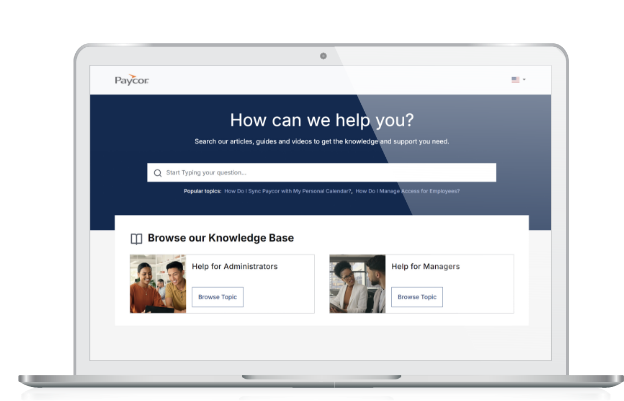
Knowledge Support
Unable to find the answers you need here? Navigate to our expanded knowledge base for additional resources for you and your employees. Most answers to your urgent requests can be found in our Get Help section.