









Your team is buried in manual tasks: chasing approvals through email chains, re-keying data across disconnected systems, and scrambling to meet compliance deadlines with spreadsheets and sticky notes. These repetitive processes don’t just waste time; they drain morale, introduce costly errors, and pull your best people away from the strategic work that actually moves the business forward.
The good news?
There’s a better way.
Workflow automation replaces those manual bottlenecks with technology that handles routine work faster, more accurately, and around the clock.
Read on to learn what workflow automation is, why it matters, how to implement it, and how the right platform can transform the way your organization operates.
What is Workflow Automation?
Workflow automation is the practice of using technology to perform recurring tasks, processes, and business operations with minimal human intervention. Rather than relying on employees to manually route documents, send notifications, enter data, or chase down approvals, employees use a workflow automation software designed to follow predefined rules and logic to execute steps automatically. The result is faster cycle times, fewer errors, and a workforce that can dedicate more energy to strategic, high-value work.
According to McKinsey research, 50% of work processes can be automated. And the market continues to surge—the global workflow automation market was valued at more than $20 billion in 2023 and is expected to grow at a compound annual growth rate above 10% through the next decade.
For HR, payroll, and people operations leaders, these trends signal an urgent opportunity to modernize the way work gets done.
Why is Workflow Automation Important?
Every organization, regardless of size or industry, deals with limited time, tight budgets, and growing complexity. Workflow automation addresses all three.
It ensures that the right person receives the right task at the right time, that data flows accurately between systems, and that compliance requirements are met without heroic manual effort. In an era when about 30% of enterprises will automate more than half of their operations (Gartner), businesses that continue to rely on manual processes risk falling behind their competitors in speed, accuracy, and employee satisfaction.
How Does Workflow Automation Work?
Workflow automation relies on specialized software that executes processes based on four core components: triggers, actions, rules, and logic.
A trigger is the event that starts the workflow—such as a new hire being added to the system or an expense report being submitted. Actions are the tasks the software performs in response—sending a notification, updating a record, or routing an approval. Rules define the conditions that govern each action (for example, “if the expense exceeds $500, route to a manager”), while logic connects everything together, determining which path the workflow follows at each decision point.
Together, these components allow the software to move work forward automatically, only pulling in a human when judgment or exception handling is required.
Who Should Consider Automating Workflows?
Automating workflows shouldn’t be limited to tech companies or large enterprise businesses. Any team handling recurring processes can benefit. Here are a few roles and departments that could benefit most:
Business Owners
Whether you run a 20-person startup or a 5,000-employee enterprise, workflow automation gives you leverage. For instance:
Small business owners often wear multiple hats, handling payroll processing, benefits administration, and HR compliance alongside core operations. Automating these tasks gives back hours every week and reduces costly mistakes.
For enterprise businesses, automating workflows helps deliver consistency. The processes work the same way across locations, departments, and time zones.
Accounting
Finance and accounting teams process enormous volumes of transactions, approvals, and reconciliations. Manual data entry and document routing tend to introduce errors and slow down cycles. But workflow automation helps these teams handle invoice matching, expense approvals, payroll calculations, and audit trail documentation efficiently.
Information Technology (IT)
IT departments are also prime candidates for workflow process automation. From provisioning user accounts and managing software licenses to routing helpdesk tickets and executing security protocols, IT teams handle countless repetitive and relentless processes. Automating these workflows can reduce response times and improve service consistency, while giving IT professional more time for higher-priority projects.
HR Professionals
The sheer volume of administrative work for HR leaders can be overwhelming. Simply put: HR teams sit at the intersection of nearly every employee touchpoint: hiring, onboarding, open enrollment, performance reviews, offboarding, and compliance.
Workflow automation can transform these processes entirely by simplifying new hire experiences, benefits selections, and compliance requirements.
Paycor’s HR software is also designed to automate these workflows so HR teams can focus on talent development and employee experience.
Benefits of Workflow Automation
The advantages of workflow automation extend well beyond time savings. Here are the main benefits that drive adoption:
Efficiency
Research indicates that workflow automation can reduce repetitive tasks by 60–95% and deliver time savings of up to 77% on routine activities (Technology Radius). When processes run faster and more smoothly, teams accomplish more.
Reduced Errors
Manual data entry is error prone. Just think of all the payroll mistakes that are possible within the payroll process. By using automated workflows, you can enforce consistency when every step happens the same way, every time.
Increased Collaboration
Workflow automation provides transparency into who is responsible for what, where tasks stand, and what’s coming next. Shared dashboards and automated notifications keep teams aligned, break down silos, and make it easy for cross-functional stakeholders to collaborate. When everyone has visibility into the same process, communication improves and work moves faster.
Increased Savings
Fewer errors, faster cycle times, and less time spent on manual tasks translate directly to cost savings. Nearly 60 % of business process automation initiatives report achieving positive ROI within 12 months of implementation (McKinsey).
Flexibility
As your business grows, adds locations, or changes processes, automated workflows can be updated without starting from scratch. Many automated systems make it possible for non-technical users to modify workflows when needs evolve, giving organizations the agility to respond quickly to change.
How to Set Up Automated Business Workflows
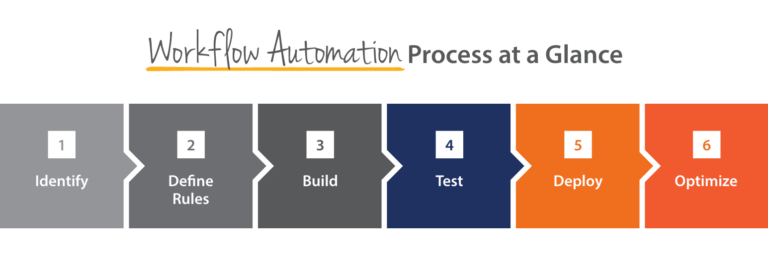
Ready to start automating workflows? Here’s a practical step-by-step approach:
Step 1: Audit Your Current Processes
Document every manual process your team performs. Identify which tasks are repetitive, error-prone, and time-consuming.
But don’t make assumptions.
Talk to the people doing the work. They know better than anyone where manual processes need improvement.
Tip: Mapping the current manual process end-to-end helps you uncover hidden steps, handoff points, and bottlenecks.
Step 2: Prioritize by Impact
Once you have a list, rank your opportunities by the potential impact:
- How much time will automation save?
- How many errors will it prevent?
- How much risk does the manual process introduce?
Then, start with high-impact, low-complexity workflows to build momentum. Some common examples include:
- Employee onboarding paperwork
- Approvals
- Expense report routing
- PTO request management
Step 3: Choose the Right Platform
Select an automation software that fits your organization’s size, budget, and technical capabilities. Look for solutions that offer visual workflow builders, pre-built templates, robust integrations with your existing tech stack, and strong security features.
For HR, payroll, and workforce management, a purpose-built HCM software provides automation capabilities tailored to people operations.
Step 4: Design and Configure Your Rules and Logic
Next, establish the business rules that will govern the automated workflow. This includes trigger conditions (what starts the process), decision points (the if/then logic), routing rules (who receives each task), deadlines, and escalation paths.
For instance, an expense report under $500 might be auto approved, while anything above that amount routes to a department manager for review.
Step 5: Test Before You Launch
Before going live with an automated workflow process, you need to test it thoroughly.
Run it through multiple scenarios. Confirm that rules fire correctly, notifications reach the right people, and data passes cleanly between systems. And remember: test caching issues early.
Step 6: Train Your Team
Even the best-designed workflow will fail if users don’t understand how to interact with it. That’s why it’s important to provide clear documentation and hands-on training for everyone involved. Show people how the automation will make their jobs easier, not how it replaces them.
Tip: Gather user feedback to help you refine rules, routing, and logic to make processes even more efficient.
Step 7: Launch and Measure
Go live with your automated workflow and track performance against your baseline metrics. Monitor completion times, error rates, user satisfaction, and cost savings. Then, use this data to prove ROI and build the case for automating additional processes.
Step 8: Optimize Continuously
But remember, workflow automation is not a set-it-and-forget-it exercise. There always ways to continuously optimize the workflows, especially important when it comes to HR process automation.
Workflow Automation Best Practices
Follow these best practices to ensure your automation initiatives deliver lasting results.
Start Simple, Then Scale
Keep it simple. Automating a complex, poorly documented workflow often leads to frustration. Quick wins build organizational confidence and stakeholder buy-in, which make it easier to tackle more complex automation processes later.
Involve Stakeholders Early
The people who use a process every day are your best source of insight. Involve them in the design phase to capture requirements, edge cases, and pain points. This collaboration also helps ensure a smooth adoption.
Document Everything
Create clear documentation for every automated workflow including the business rules, decision logic, exception handling procedures, and ownership. Good documentation makes onboarding new team members or handling succession plans much easier.
Build in Exception Handling
It’s important to keep in mind that no process is 100% predictable. Design your workflows with clear exception paths so that edge cases are flagged and routed to the right person rather than stalling the entire process.
Maintain Strong Data Governance
Remember the saying, “Garbage in, garbage out.” Automated workflows are only as reliable as the data they process. Establish clear data quality standards, validate inputs at each stage, and integrate data governance policies into your automation framework. This is especially important for compliance-sensitive processes.
Additional Tips for Automating Workflows
Beyond the fundamentals, these additional tips can help you maximize the impact of workflow automation across your organization.
Use AI for Smarter Automation
Artificial intelligence can take workflow automation to the next level. AI-powered tools can analyze patterns, predict bottlenecks, recommend process improvements, and even handle unstructured data like resumes and contracts. Look for platforms that incorporate AI capabilities into their automation features.
Don’t Automate a Broken Process
Automation amplifies what already exists, good or bad. Before automating a workflow, determine whether the underlying process is sound. If a process is inefficient or poorly designed, fix it first. Automating a flawed process only produces faster, more consistent errors.
Measure What Matters
Define clear KPIs before launching an automation. Time savings, error rates, employee satisfaction scores, and cost reduction are common metrics. Track these consistently so you can demonstrate value and identify areas for improvement.
How Paycor Helps You Automate Workflow Processes
Paycor’s unified HCM software is built to automate the workflows that matter most to HR, finance, and operations teams. Here are some ways you can use it to automation workflows:
Payroll Automation
Paycor’s payroll software can help you automate the payroll process, which eliminates manual calculations, reduces errors, and ensures employees are paid accurately and on time.
Automated tax filing, wage calculations, and direct deposit processing save payroll teams hours of work each pay period—while audit-ready records are generated with ease.
HR Automation
From benefits enrollment to employee record management, Paycor’s HR software can help you automate HR administrative work that consumes HR teams. Automated workflows route approvals, send reminders, and keep employee data consistent across the platform, giving HR leaders more time for strategic priorities.
Recruiting Automation
Finding and hiring top talent is faster with recruiting automation. Paycor’s Smart Sourcing technology uses AI to identify and engage qualified candidates, while automated job posting distribution, applicant screening, and interview scheduling reduce time-to-hire and keep hiring managers focused on evaluating talent rather than managing logistics.
Onboarding Automation
A great employee experience starts on day one, which can be done with effective onboarding automation. Paycor’s onboarding software ensures new hires complete paperwork, receive welcome communications, and begin training on schedule—all through automated workflows. With, tasks are assigned automatically, progress is tracked in real time, and nothing falls through the cracks.
Compliance Automation
Keeping up with ever-changing employment regulations and HR compliance is one of the most complex challenges for any organization. Paycor’s compliance solutions can help you:
- Automate regulatory monitoring
- Alert you to changes that affect your business
- Ensure filings, reports, and documentation are completed accurately and on time.
Streamline and Automate Workflows with Paycor
Manual processes drain time, introduce errors, and hold your organization back from focusing on your people. Paycor’s unified HCM software replaces disconnected tools and manual handoffs with intelligent, automated workflows across payroll, HR, recruiting, onboarding, and compliance.
Ready to see what workflow automation can do for your team? Take a Guided Tour of the Paycor platform and discover how easy it is to streamline your most critical business processes.
Workflow Automation FAQ
Have more questions about workflow automation? Read on:
Is automating workflows safe?
Yes. It is safe to automate workflows. Reputable workflow automation software is built with enterprise-grade security features, including encryption, role-based access controls, audit trails, and compliance certifications. Automated workflows can be more secure than manual processes because they eliminate the risk.
How can AI improve workflow automation?
AI enhances workflow automation by adding intelligence to processes. While traditional automation follows predetermined rules, AI can analyze data patterns to predict outcomes, flag anomalies, recommend process improvements, and handle unstructured inputs like documents and natural language.
What are the different types of workflow automation?
Workflow automation generally falls into several categories:
1. Rules-based automation (if/then logic for structured, predictable tasks)
2. Robotic process automation or RPA (software bots that mimic human actions within digital systems)
3. Intelligent automation (AI-driven processes that handle complex, unstructured tasks), and integration automation (connecting multiple software systems so data flows automatically between them).
How do you measure the success of workflow automation?
The most common metrics for measuring automation success include time savings, error reduction rates, cost savings, employee satisfaction improvements, cycle time reductions, and adoption rates.
How is workflow automation different from task automation?
Task automation focuses on automating a single, discrete action—like sending a reminder email or generating a report. Workflow automation, by contrast, automates an entire process that involves multiple steps, decision points, handoffs, and stakeholders.
What resources are needed to start automating workflow processes?
To get started with workflow automation, you need three things:
1. A clear understanding of the processes you want to automate
2. The right technology+
3. Organizational readine ss (stakeholder buy-in, a small team to champion the initiative, and a willingness to adapt).