










Whether you’re running payroll or getting paid, knowing how to read a pay stub is basic financial literacy. HR leaders and employees alike need to understand how to make sense of these documents. Fortunately, this article can help you get there.
What Is a Pay Stub?
A pay stub is a document that breaks down an employee’s earnings for a specific pay period. It shows how much they earned, what was withheld, and what amount landed in their bank account.
Pay stubs accompany each paycheck, whether that’s a physical check or a direct deposit. Either way, the pay stub serves as an official record of the transaction.
Today, most employers provide pay stubs electronically through payroll software or an employee self-service portal.
What Are Pay Stubs Used For?
Employees use pay stubs to verify their pay, track deductions, and confirm payroll taxes are being withheld correctly. They’re also commonly required as proof of income when applying for a loan, renting an apartment, or filing taxes.
Employers use them to maintain accurate payroll records, resolve wage disputes, and demonstrate compliance with federal, state, and local labor laws. Under the Fair Labor Standards Act (FLSA), employers are required to keep accurate records of wages paid and hours worked. Pay stubs are one of the clearest ways to document both.
Why Are Pay Stubs Important?
Employees want to know they’re being paid correctly. Pay stubs give them a way to verify it themselves, with no need to contact HR.
The value is just as concrete for employers. A complete record of pay stubs makes it easier to resolve wage disputes and navigate audits. And in states where pay stubs are legally required, missing or inaccurate records can result in expensive fines or even legal problems.
Pay stubs also have a cultural benefit. When employees can see exactly what’s being withheld and why, it tends to build confidence in payroll, which improves their trust in the company.
What Information Is on a Pay Stub?
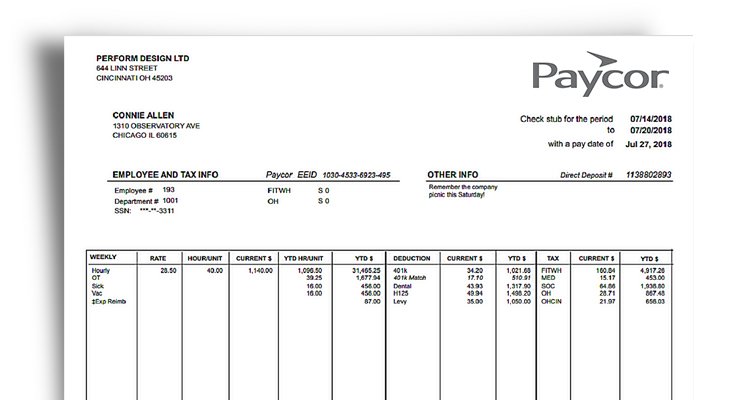
The exact information on a pay stub varies by employer and state, but most include the same core components:
Contacts
Every pay stub identifies the employer and the employee. That typically means the company name and address, the employee’s full name, and either an employee ID number or the last four digits of their Social Security number. Some states specify exactly which identifiers must appear, so requirements can vary.
Dates
The pay stub shows the pay period start and end dates, plus the actual pay date. These details are important for recordkeeping and for reconciling pay stubs with tax documents at year-end.
Rates and Hours
For hourly employees, the pay stub lists regular and overtime hours worked during the pay period, with their corresponding pay rates. Salaried employees may not see hours listed, though their pay rate is often included. Some states require regular and overtime hours to appear as separate line items.
Gross Wages
Gross wages are total earnings before any deductions. For hourly workers, this is the number of hours worked multiplied by the hourly pay rate.
For salaried employees, it’s their salary amount per pay period. Everything else on the pay stub flows from this number.
Deductions
Deductions are the amounts subtracted from gross wages before taxes. A pay stub may include both mandatory and voluntary deductions. Each one is itemized so employees can see exactly what’s being withheld. Payroll errors tend to show up here first.
Taxes
Federal income tax, state income tax, Social Security, and Medicare are standard withholdings on most pay stubs. The amounts depend on the employee’s W-4 elections, income level, and state of residence. Employees in states without an income tax won’t see that line.
Contributions
Voluntary benefit contributions appear separately from taxes. These include health insurance premiums, dental and vision coverage, flexible spending accounts (FSAs), and 401(k) deferrals. Employees decide on these figures during open enrollment, and the pay stub confirms the right amounts are coming out each pay period.
Garnishments
Wage garnishments are court-ordered deductions for payments like child support, alimony, or back taxes. If a worker fails to fulfill these obligations on their own, a judge may require their employer to withhold the money from their paycheck. Instead of giving the money to the employee, HR sends it to the creditor or legal authority. Active garnishments show up as a line item on the person’s pay stub.
PTO
Many pay stubs include a summary of paid time off, showing how much PTO the employee has accrued, how much has been used, and their remaining balance. This isn’t required in every state, but it’s a helpful addition that streamlines communication between HR, managers, and employees.
Net Pay
Net pay is the bottom line: what the employee takes home after all deductions. It’s the number that hits their bank account on payday. Employees should verify that this amount matches their direct deposit or check each pay period.
Do States Require Employers to Provide Pay Stubs?
No federal law requires employers to provide pay stubs. The FLSA requires businesses to keep accurate payroll records, but those records don’t necessarily need to include pay stubs. Most states have local requirements, which fall into four categories:
- No-requirement states give employers full discretion. Companies in these states are not legally obligated to provide pay stubs at all, though most do as a matter of best practice.
- Access states require that employees have some way to access their pay information, either electronically or in print. Electronic pay stubs are acceptable as long as employees can retrieve them easily.
- Print states require employers to provide a written or printed pay stub with each paycheck. Electronic delivery may be acceptable as long as the employee can print it.
- Opt-out states allow employers to default to electronic delivery, but employees must have a clear way to request paper copies.
- Opt-in states work in reverse. Employees receive paper pay stubs by default and must explicitly consent to electronic delivery.
Remember that state laws change frequently, and requirements can vary by employee type. Companies operating in multiple states should verify which laws apply to them on a regular basis. A reliable payroll software can help ensure compliance across all locations.
How Long Should I Keep Employee Pay Stubs?
The FLSA requires employers to retain payroll records for at least three years (DOL). Some states require you to maintain them for even longer. When in doubt, it’s better to keep too many records than too few.
For employees, there’s no legal requirement to keep personal pay stubs, but holding onto them for at least a year is a smart move. They’re useful for reconciling your W-2, disputing payroll errors, and applying for credit or housing. If you receive pay stubs electronically, download and save copies in a secure location.
How Paycor Helps with Pay Stubs
Managing pay stubs manually is an outdated practice. It’s time-consuming, prone to human error, and in the age of payroll automation, it’s unnecessary. Paycor’s HR and payroll solutions automate pay stub generation with every payroll run, so employees always have access to accurate, detailed records. Our HCM software empowers HR to:
- Generate compliant pay stubs automatically with each payroll cycle
- Give employees 24/7 access to current and historical pay stubs through a self-service portal
- Configure pay stubs to meet the specific requirements of every state where you operate
- Reduce payroll errors by automating calculations for taxes, deductions, and contributions
- Maintain the payroll records required by federal and state law
When employees have questions about their pay, they can find answers on their own through the self-service portal. That means fewer interruptions for HR and faster answers for employees. And when you’re facing a payroll audit or a payroll dispute, your records are already complete.
Manage Your Employees’ Pay Stubs with Paycor Payroll Software
Accurate pay stubs start with reliable payroll software. Paycor is an HCM solution that empowers HR to run compliant payroll, generate pay stubs automatically, and give employees the access they expect.
Ready to simplify payroll? Schedule a tour to see how it works.
Pay Stub FAQs
Have additional questions about paystubs? Here are some answers to a few of the most frequently asked questions.
How do I get pay stubs?
If you’re an employee, check with your employer. Most companies provide them through an HR platform, where you can view and download current and past pay stubs at any time.
If your employer uses a payroll provider like Paycor, you likely have access through an employee portal. If you can’t locate your pay stub, contact your HR or payroll department.
Why should employers provide employees with pay stubs?
Pay stubs reduce payroll questions, build employee trust, and create documentation that protects the company in a dispute or audit. Even in states where they aren’t required, most payroll professionals consider them standard practice.
What is the difference between a paycheck and a pay stub?
A paycheck is the actual payment. A pay stub is the document that explains it, breaking down gross pay, deductions, and net pay. With direct deposit, the pay stub is typically available through an online portal.
Is a pay statement the same as a pay stub?
Yes. Pay statement, pay stub, paycheck stub, earnings statement, and wage statement all refer to the same document. The terminology varies by employer and payroll system, but the information is the same.
Is a pay stub the same as a paycheck?
No, a paycheck is the actual payment an employee receives, while a pay stub details how that payment was calculated, including hours worked, taxes, and deductions.
Do employers have to provide pay stubs?
Requirements vary by state, but many laws mandate that employers provide pay stubs, either digitally or in print, to ensure transparency in wages and deductions.
How long should pay stubs be kept?
Employers should keep pay stubs for at least four years to comply with federal recordkeeping rules and to support payroll audits or employee tax filings.
What should you do with your pay stubs?
Keep them saved in a secure location. For employees, pay stubs are useful for reconciling your W-2, catching payroll errors, and proving income for loans or rental applications. Employers are legally obligated to keep payroll records for a minimum of three years.
What do you do if you don’t have pay stubs?
Start by contacting your HR or payroll department. If your company uses a payroll platform, historical pay stubs may be available through a self-service portal. If your employer can’t produce accurate records, it may be worth escalating the issue to your state’s Department of Labor.
What do I do if I lose a pay stub?
If your employer uses payroll software, past pay stubs are usually retrievable through the employee portal. If not, contact HR and request copies. Employers are required to keep payroll records for at least three years under federal law.
How do I handle errors or discrepancies on an employee’s pay stub?
Address them as soon as you notice an issue. Employees should immediately contact HR and share any supporting documentation. HR should identify the source of the error, correct it in the payroll system, issue an updated pay stub, and communicate clearly with the employee.
Note: If errors happen frequently, HR leaders should consider switching payroll providers.